Sign In
Sign Up
Select Your Country
 Turkey (Türkçe)
 Worldwide (English)
Turkey (Türkçe)
Worldwide (English)
Turkey (Türkçe)
Worldwide (English)
Worldwide (English)
Turkey (Türkçe)
Worldwide (English)
Turkey (Türkçe)
Worldwide (English)
 WELCOME Kupon Kodunu Kullanarak İlk Siparişlerinize Özel %10 İndirim İmkanından Faydalanabilirsiniz.

Hello, in this article we will give you information about the use of Mobile Proxy services.
In Mobile Proxy services;
We will tell you about 2 different ways to establish a proxy connection. First, if you are a Windows operating system user, you can open the relevant setup page by typing Proxy Settings in the search section.
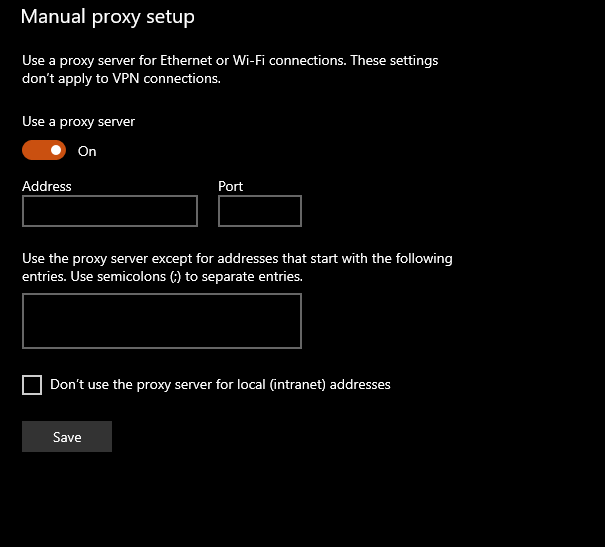
You need to activate the Use proxy option in the Manual proxy setup section at the bottom of the page, enter the Proxy Address information for your Mobile Proxy service in the Address section, the Port information in the Connection Point section, and click the Save button.
For example, the Proxy settings will be like this;
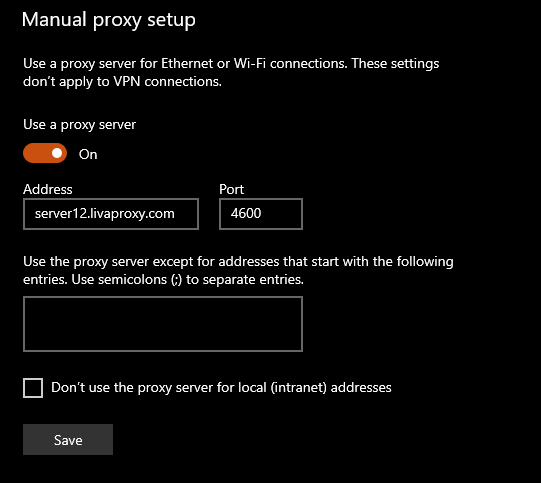
After this process, when you try to connect to any website with any of your web browsers, you will be prompted for authentication, asking you to enter your Username and Password.
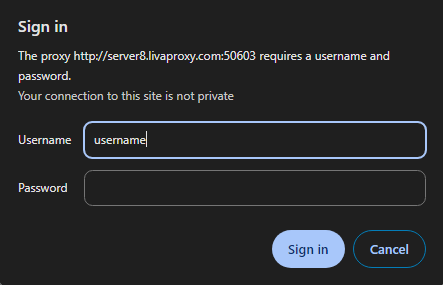
After entering your information correctly, when you click the Log In button, you will have established the Proxy connection. You can connect to the browser and restricted applications with the proxy connection you have connected to with Windows.
You can continue your work after the relevant procedures are completed. We offer you the authority to change the IP address assigned to your Mobile Proxy service.
Thanks to the IP Rotate Connection delivered to you, you can change the IP address assigned to your Mobile Proxy service. You must run the IP Rotate Connection in the browser or login where the Proxy connection is not active. After triggering the connection, a response will be returned from the server within approximately 5-15 seconds. Your connection will be disconnected during the IP change process, and your connection will be active again when your new IP address is assigned.
If you want to continue your games during the periods automatically stored by the IP address assigned to your Mobile Proxy service, you can submit your support request.
Thank you for choosing us.
